Your documents shouldn’t create more work. Turn them into action.
ProjectOnUs reads your project documents, checks them against your contracts, files them where they belong, and runs the next step automatically — approvals, tasks, logs and reminders. Built for construction and project-driven teams.
Instant 14-day trial · No credit card · Sign in with Google or Microsoft
- Filed in Harborline TI › Pay Applications, added to the pay app log
- ⚠ Flagged: $17,450 over the contract balance
- Approval blocked until the insurance certificate arrives
- Upload link sent to Apex — no account needed
- Tasks created: verify quantities, process payment
- Payment due date added to key dates
ProjectOnUs doesn’t just store your documents. It does something with them.
Today: someone receives Contract.pdf and…
- Opens it and reads it
- Renames it and finds the right project
- Moves it and tags it
- Emails someone to approve it
- Creates tasks for what it requires
- Adds dates to the calendar
- Remembers the renewal date — hopefully
- Chases the approval
Lots of manual steps per document — and things slip.
With ProjectOnUs
Upload → AI understands it → your workflow handles the rest.
Key facts extracted, filed in the right folder, approval routed, follow-up tasks created with owners and dates, reminders set — and every step recorded in the document’s history.
You check the result. Nothing is forgotten.
Every document tracked from arrival to done
A Workflow tab on every project: where each document is, who it’s waiting on, what it costs, what’s missing — and the logs you used to keep in Excel.
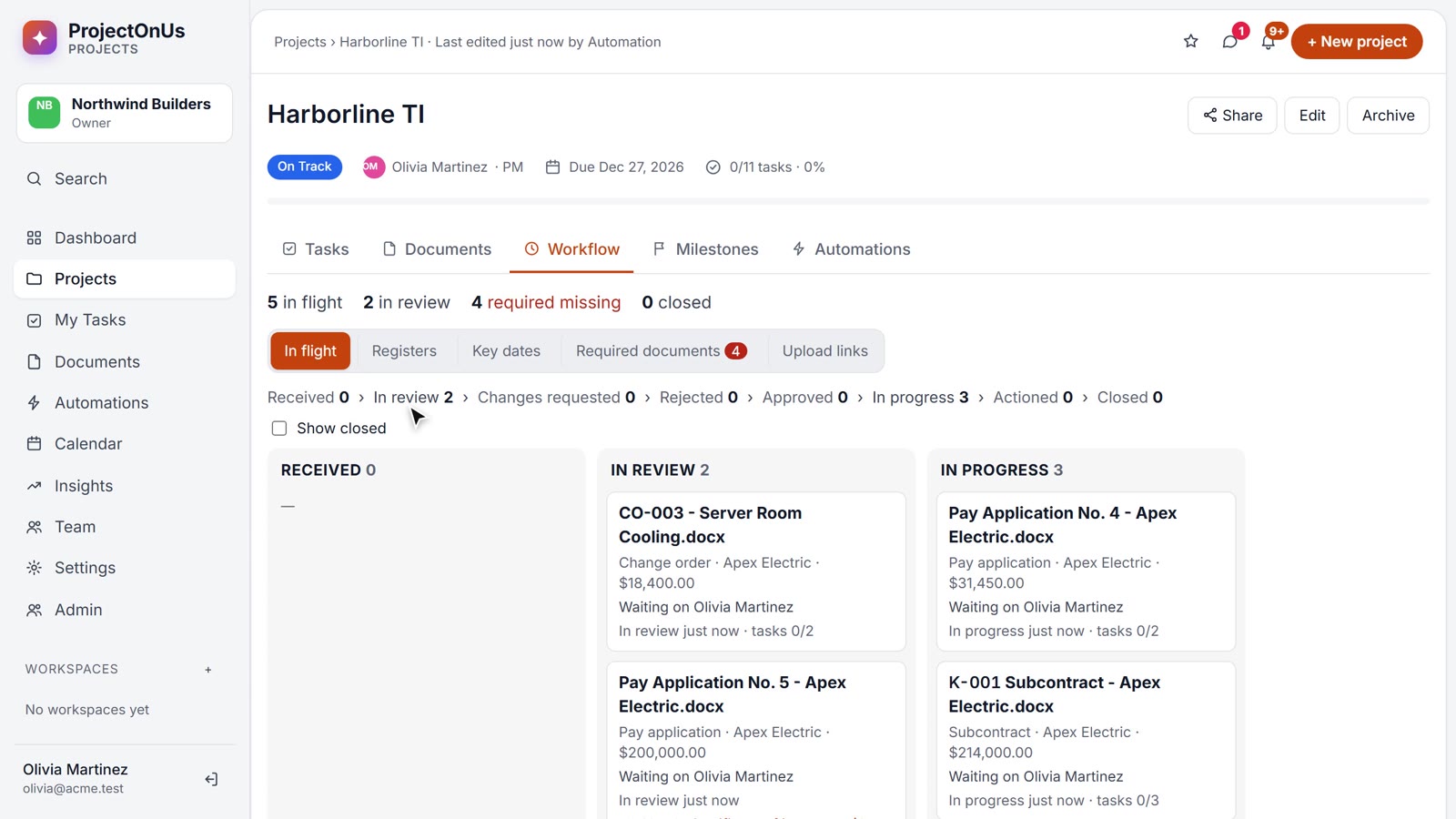
See every document’s stage — and who has it
Received, in review, changes requested, approved, in progress, actioned, closed. Documents move on their own as approvals finish and their follow-up tasks get done.
- Who it’s waiting on, and for how long
- Overdue approvals and tasks flagged
- Answers matched to questions — link an RFI response and the RFI closes
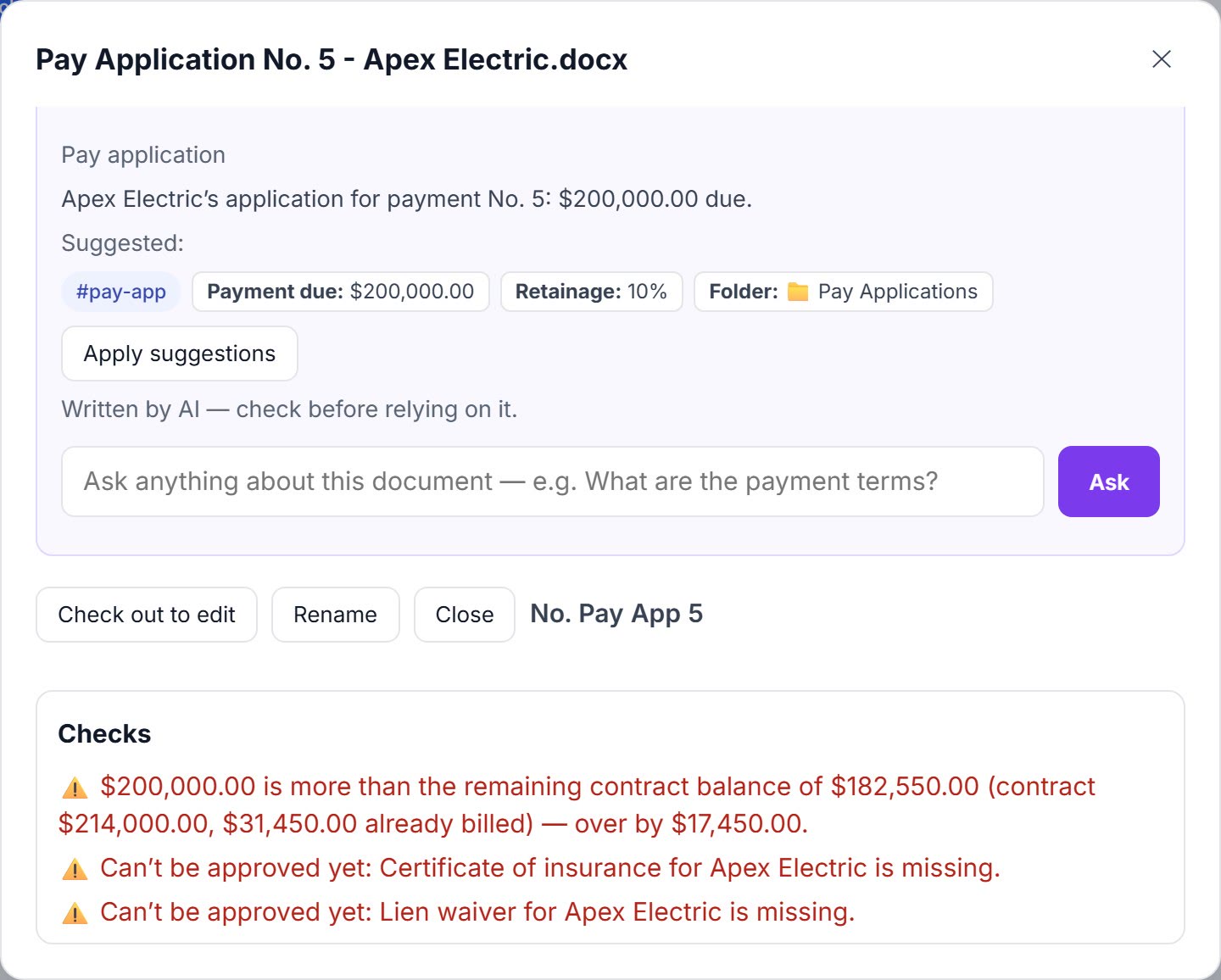
It checks the numbers before you approve
A pay application that bills more than what’s left on the contract, a lien waiver that doesn’t match its pay app, a change order that moves the contract sum — flagged on the document, before anyone signs.
- Contract balance with approved change orders
- Lien waiver amount vs. pay application
- Approval blocked while a required document is missing or expired
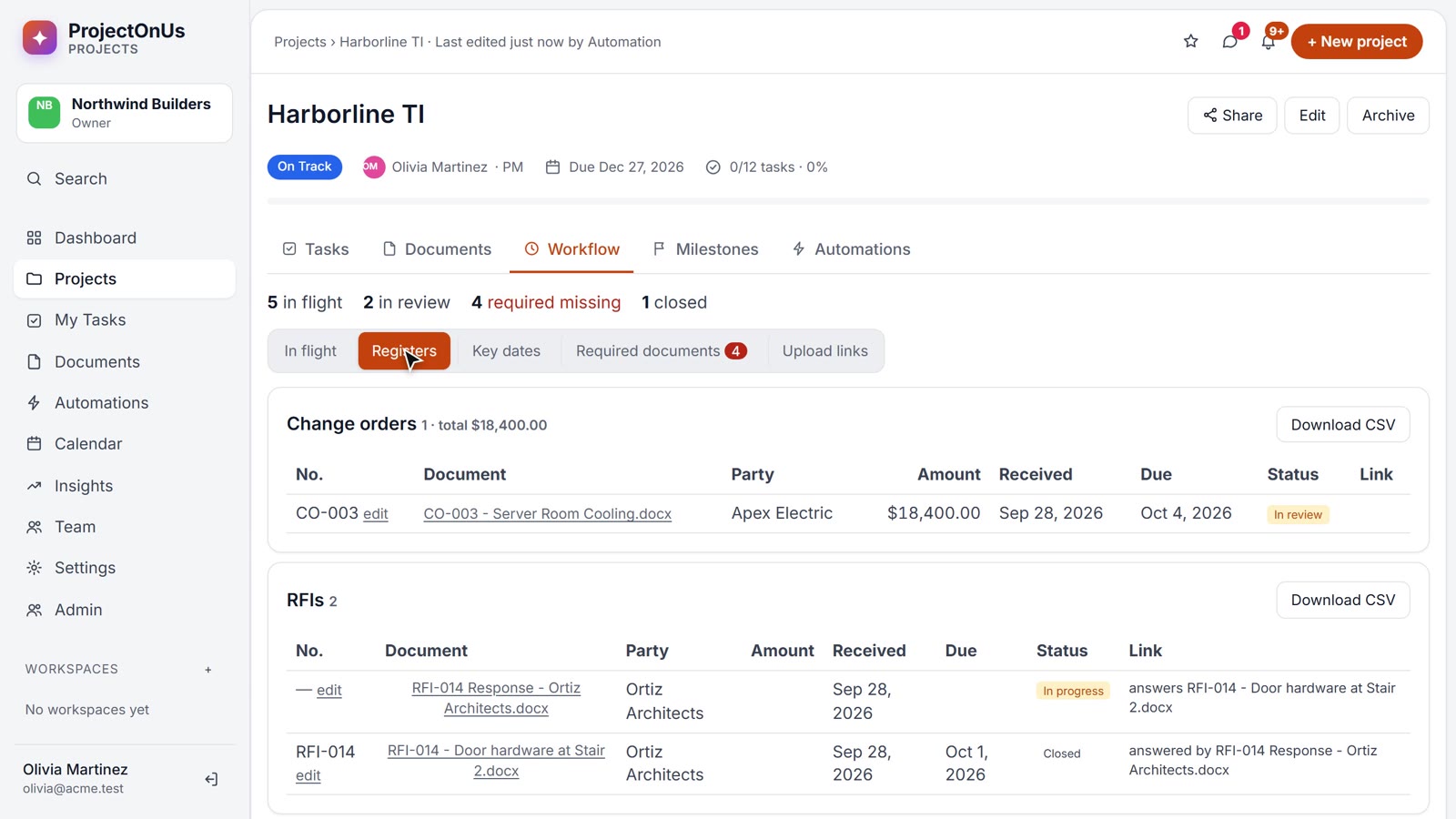
Logs that keep themselves
Change orders, RFIs, submittals, pay applications, lien waivers, notices and contracts — numbered, totalled and linked, as documents arrive. Download any log for Excel.
- Uses the document’s own number, or the next one in sequence
- Duplicate numbers flagged
- Amounts, parties, due dates and status in one table
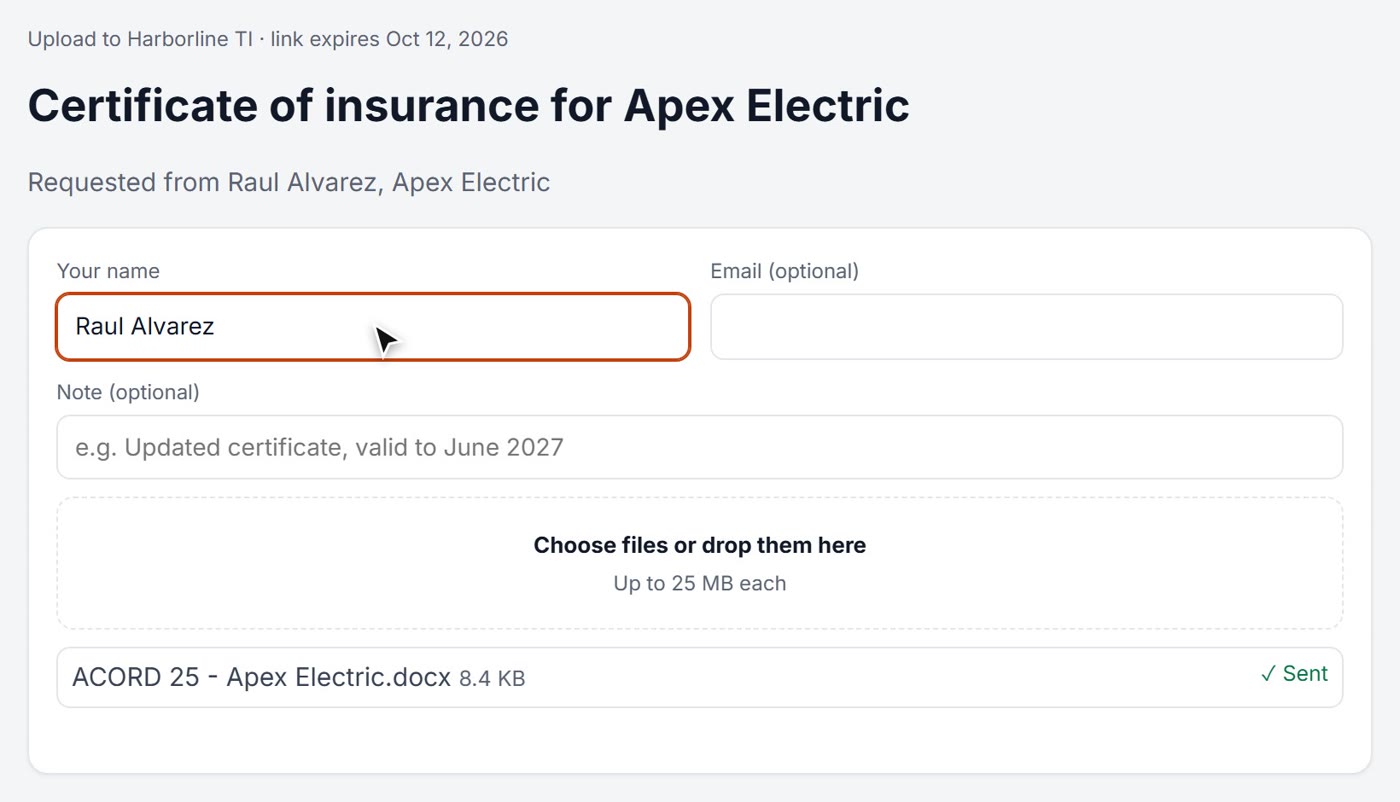
Chase paperwork with a link, not an email thread
Required documents are tracked per subcontractor. When one is missing, send a secure upload link: they upload without an account, and it’s read, filed and checked on arrival. Reviewers outside the company can approve or request changes the same way.
- Required documents per subcontractor — insurance, W-9, lien waivers
- Upload links straight into the right folder
- Outside review links: approve, reject or request changes
Key dates from the fine print
Response dates, notice deadlines, payment and registration dates pulled from documents — with reminders 3 days before and on the day.
Tasks that cite the clause
Every task created from a document shows the exact phrase and page it came from — one click opens the document.
Workflows in one sentence
“Change orders over $10,000: tell the admins and send them for approval.” Describe it — AI builds the automation for you to check.
Three workflows your team runs every week
Contracts
Obligations, deadlines and renewals never slip again.
Project documents
Every file organized the moment it arrives — and findable later.
Approvals
Routed, reminded, stamped — with an audit trail you can show a client.
AI reads every page — then answers your questions
Summaries, tags and key facts for every upload, including scanned documents. Ask a 50-page document a question and get the answer with the exact clause and page.
- Search finds words inside PDFs, Word, Excel and scans
- Extraction tuned to your industry
- Works on long documents, page 1 to page 50
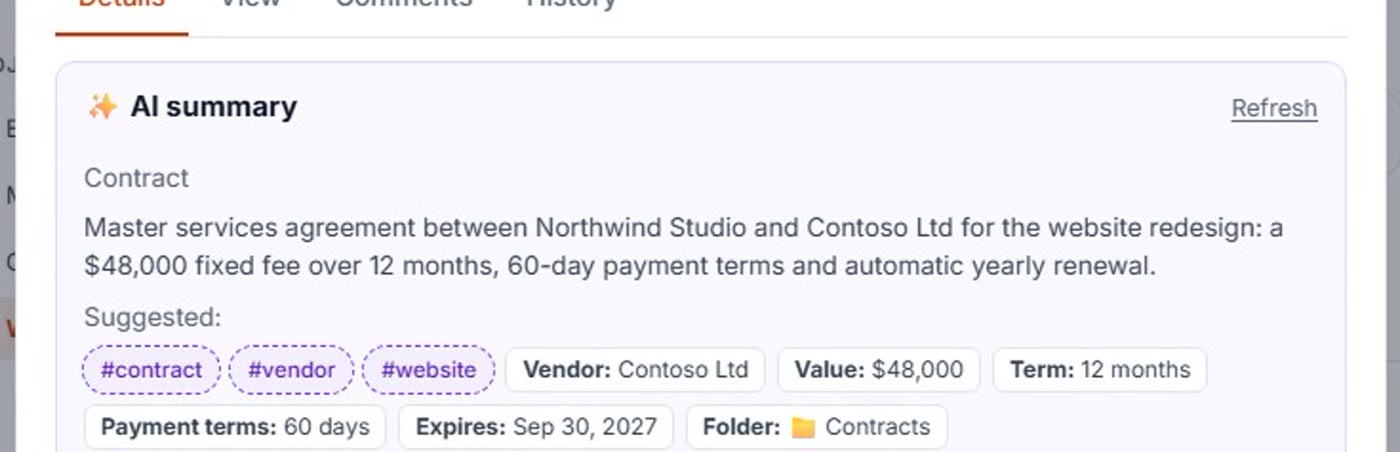
Workflows that start themselves
“When a change order is uploaded, file it, send it for approval and create the follow-up tasks.” Pick a template, describe a new one in a sentence — and ProjectOnUs suggests the ones you’re missing from your own data.
- AI creates tasks from obligations and deadlines
- Approvals with due dates, reminders, escalation — and “request changes” that re-reviews the next version
- Route by amount: “over $10,000 also goes to the owner”
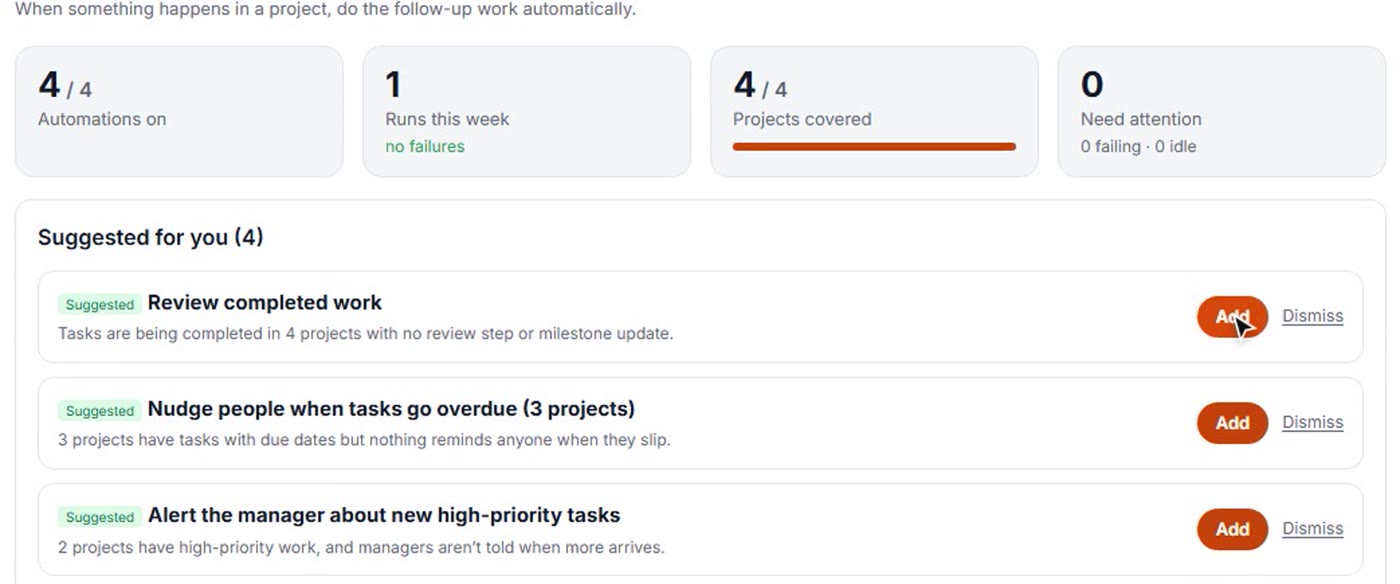
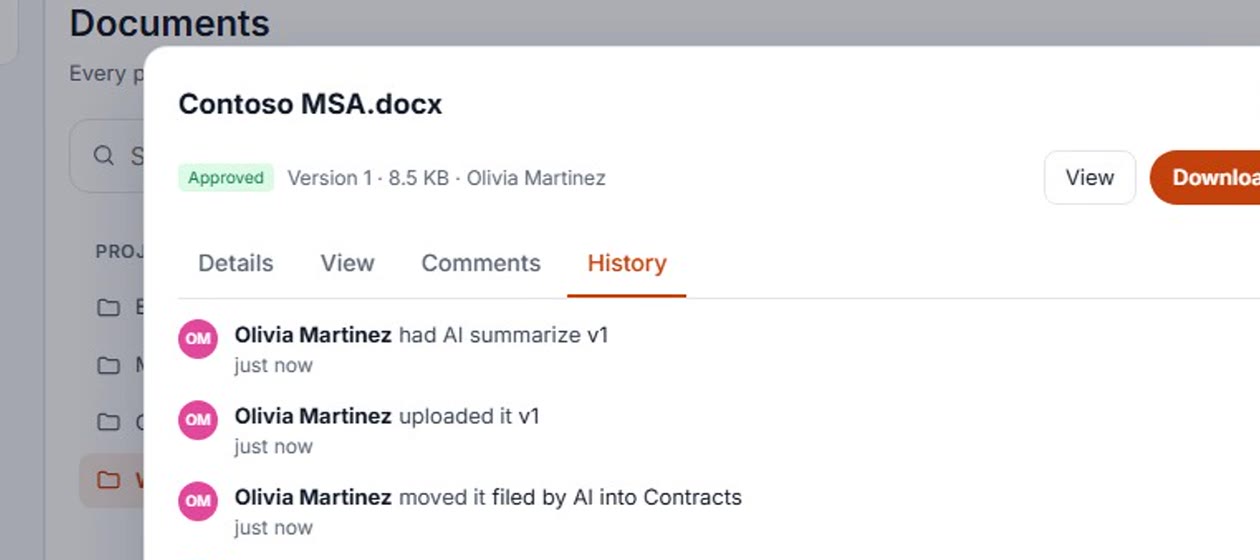
Every step recorded. Every project on schedule.
A full history on every document, plus project health, forecasts and an AI read-out of what needs attention this week.
- Document history and approval certificates
- Projects, tasks, boards and team chat
- Insights with forecast finish dates
If your projects run on paperwork, this is for you
Priced for the work it saves, not the seats
Simple monthly packages for your whole team. Every new organization gets 14 days of Business, free.
Starter
- 5 users
- 10 GB storage
- Document management + AI extraction
- Basic workflows (20 automations)
- 100 scanned pages a month
Business
- 15 users
- 100 GB storage
- Automated document workflows
- Workflow tab: registers, key dates, required documents
- Outside upload & review links
- AI tasks from documents
- Approvals + AI assistant
- All industry packs
- 1,000 scanned pages a month
Operations
- 50 users
- 500 GB storage
- Unlimited automations
- Higher AI limits + premium AI
- 5,000 scanned pages a month
- Full audit history
Just trying it out? Free for up to 3 users — no credit card.
Questions, answered
What does ProjectOnUs do?
It turns project documents into action. Upload a contract, report, invoice or project file: AI extracts the important information, files it where it belongs, starts approvals, creates follow-up tasks with owners and due dates, and sets reminders for important dates.
Do I have to set up workflows myself?
No. Start from ready-made templates (contracts, approvals, expiring documents, change orders, RFIs…) and ProjectOnUs suggests the ones you’re missing based on your own projects and documents. You can adjust any of them in plain language.
Can subcontractors or clients send and review documents?
Yes, without an account. Send an upload link and they can upload straight into the project folder you choose — the document is read, filed and checked like any other. Review links let someone outside your company approve, reject or request changes, once, and every step is recorded in the document’s history.
What does it check before I approve?
For each document it compares what AI read against the rest of the project: a pay application against the remaining contract balance (including approved change orders), a lien waiver against its pay application, duplicate numbers, and the documents you require on file — for example, approval of a pay application can be blocked until that subcontractor’s insurance certificate is current.
Is there a free plan?
Yes — free for up to 3 users. New organizations also get a 14-day trial of the Business plan.
Is my data used to train AI?
No. AI runs on Amazon Bedrock, which doesn’t use your data to train models. Each organization’s data is kept separate, and admins can switch AI features on or off.
Can it read scanned documents?
Yes. Scanned PDFs and photos are read with OCR, so they’re searchable and AI can extract information from them. Monthly page limits depend on your plan.
How do people sign in?
With their Google or Microsoft account (work, school or personal). You create your organization yourself in a minute; everyone else gets in only when an admin of your organization invites them.
Upload. Understand. Automate. Track.
Start your free 14-day trial: sign in with Google or Microsoft and name your organization. You’re in within a minute.